How QR Codes Work
Summary
QR codes are machine-readable patterns that store information such as website links, payment details, contact information, and product data. Smartphones decode these patterns using cameras and software, allowing users to access information instantly with a simple scan.
DOWNLOAD PDF
How QR Codes Work
QR codes have become an important part of modern life. We use them to make digital payments, access restaurant menus, visit websites, download applications, verify tickets, and even connect to Wi-Fi networks. But have you ever wondered how these small black-and-white squares actually work?
QR stands for Quick Response. The technology was invented in 1994 by the Japanese company Denso Wave to track automotive parts during manufacturing. Unlike traditional barcodes, QR codes can store a much larger amount of information and can be scanned much more quickly.
At first glance, a QR code may appear to be a random collection of black squares. However, every pattern has a specific purpose.
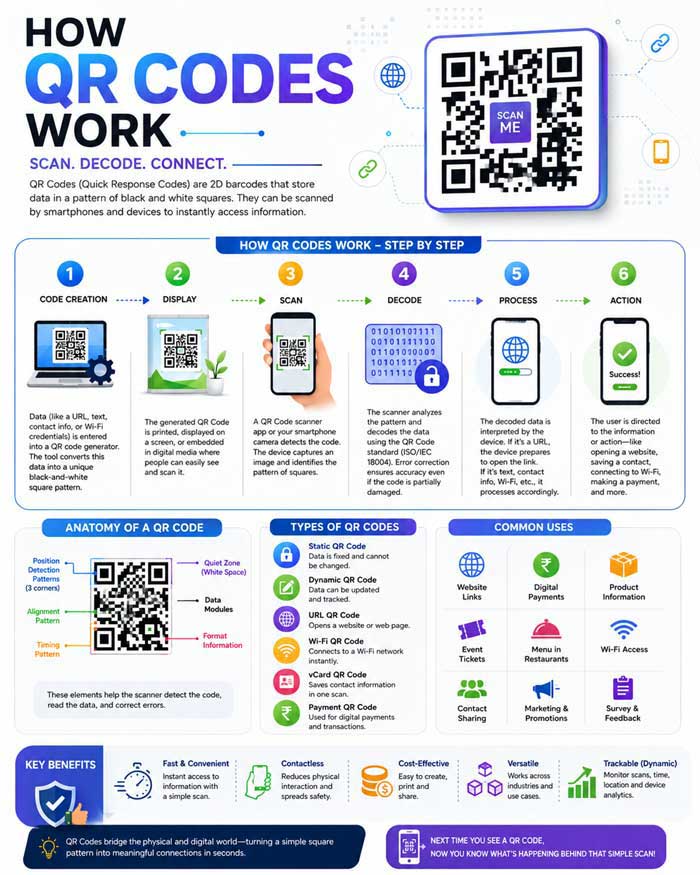
A QR code contains several important components. The three large squares located in the corners are called finder patterns. These help the scanner determine the code’s orientation. Whether the code is upside down, tilted, or rotated, the scanner can still identify it correctly.
Another important component is the alignment pattern, which helps the scanner read distorted or curved QR codes. Timing patterns, which appear as alternating black-and-white modules, help determine the structure and size of the code.
The tiny squares inside a QR code are known as modules. These modules represent binary data using two values:
- Black squares represent one value.
- White squares represent another value.
The combination of these squares creates encoded information.
When you scan a QR code with your smartphone, several things happen within seconds.
First, the phone’s camera captures an image of the code. The scanning software then identifies the finder patterns and determines the code’s orientation.
Next, the software converts the pattern into digital data. It analyzes every black and white module and translates the pattern into binary code.
After decoding the information, the smartphone performs the required action. Depending on the stored data, it may:
- Open a website.
- Display contact information.
- Process a payment.
- Connect to a Wi-Fi network.
- Show a text message.
- Download an application.
One of the biggest advantages of QR codes is their storage capacity.
A traditional barcode stores information in one dimension, usually as a series of vertical lines. In contrast, a QR code stores information both horizontally and vertically. This two-dimensional design allows QR codes to hold thousands of characters.
Another remarkable feature is error correction.
QR codes can still function even when part of the image is damaged. Built-in error correction technology reconstructs missing information by using redundant data stored inside the code.
This is why many QR codes continue to work even if they are scratched, partially covered, or printed on uneven surfaces.
Today, QR codes are used across numerous industries.
Retail businesses use them for product information and promotions. Banks rely on them for digital payments. Airlines use them for electronic boarding passes. Restaurants provide digital menus through QR codes, reducing the need for printed materials.
The COVID-19 pandemic accelerated the adoption of QR codes worldwide. Contactless payments and touch-free interactions became increasingly important, leading businesses to integrate QR technology into their daily operations.
However, users should remain cautious while scanning unknown QR codes.
Cybercriminals sometimes create fake QR codes that redirect users to malicious websites. Before entering sensitive information, always verify the source and ensure that the destination website is legitimate.
As technology continues to evolve, QR codes will likely become even more common. Their ability to store information, simplify communication, and enable instant interactions makes them one of the most practical digital tools available today.
From making a payment at a grocery store to accessing a restaurant menu, QR codes quietly power many of the digital experiences we rely on every day.
Key Takeaways
- QR stands for Quick Response.
- QR codes were invented in 1994.
- They store information using black-and-white square patterns.
- Smartphones decode QR codes through image recognition and software.
- QR codes can store much more information than traditional barcodes.
- Error correction allows damaged QR codes to remain readable.
- QR codes are widely used for payments, websites, tickets, menus, and product information.
- Users should avoid scanning QR codes from untrusted sources.