
How Wi‑Fi Works
Invisible radio waves connect your devices to the world. Wi‑Fi turns digital data into wireless signals, bridging your phone, router, and the internet.
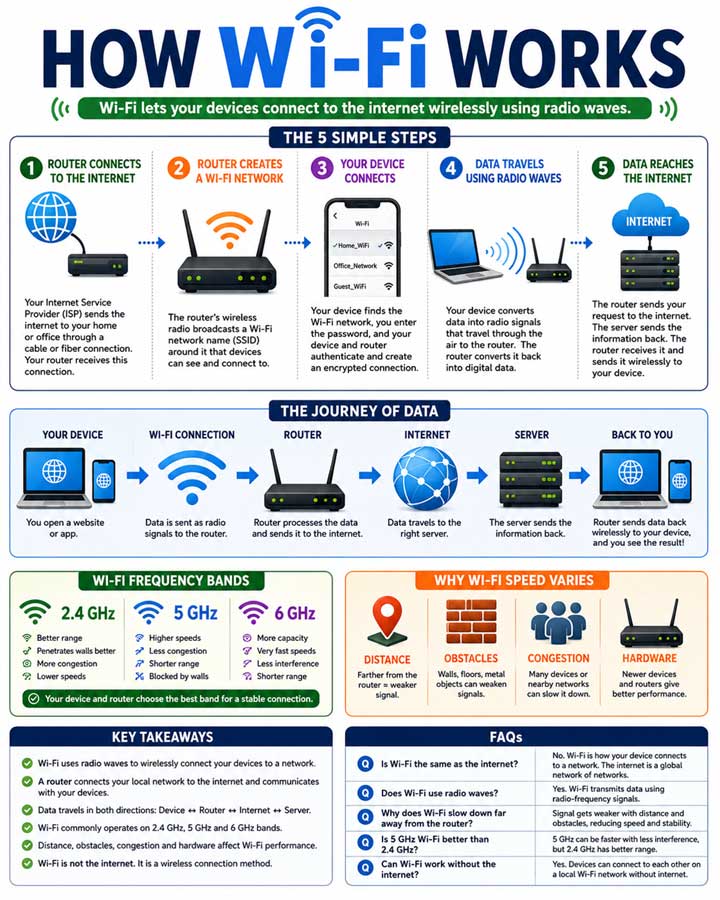
How Wi‑Fi Works
Connecting the world wirelessly, one radio wave at a time.
Wi‑Fi is one of those technologies we use every day without thinking about what happens behind the scenes. When you connect your phone, laptop, smart TV, or other device to Wi‑Fi, information is being transmitted through the air using radio waves.
But how does Wi‑Fi actually turn your internet connection into something your devices can use wirelessly?
Let's break the process down into simple steps.
What Is Wi‑Fi?
Wi‑Fi is a technology that allows electronic devices to communicate with a network without using physical cables. It uses radio waves to send and receive data between your device and a wireless router or access point.
Your router usually has two main jobs:
- It connects your home or office network to the internet.
- It communicates wirelessly with your devices using radio signals.
Wi‑Fi itself isn't the internet. Instead, it is a wireless connection method that allows your devices to access a network and, usually, the internet.
How Does Wi‑Fi Work?
The basic process can be understood in several steps.
1. Your Router Connects to the Internet
Everything starts with your internet connection. Your Internet Service Provider (ISP) sends an internet connection to your home or office through a cable, fiber connection, or another connection technology. Your router receives this connection and creates a local network.
2. The Router Creates a Wireless Network
The router contains a wireless radio that broadcasts radio signals around it. When you see a Wi‑Fi network such as Home_WiFi, Office_Network, or Guest_WiFi, that network is being broadcast by a wireless router or access point. The router's wireless radio communicates with nearby compatible devices.
3. Your Device Finds the Wi‑Fi Network
Your smartphone or laptop continuously looks for nearby Wi‑Fi networks. When you open the Wi‑Fi settings, your device displays available networks. Once you select a network, your device attempts to establish a connection with the router.
4. Data Is Converted Into Radio Signals
This is where things become interesting. Digital information is ultimately represented as bits — 0s and 1s. Your device's Wi‑Fi hardware converts that digital information into a form that can be transmitted using radio waves. The radio signal travels through the air between your device and the router. The router receives the signal and converts the information back into digital data.
5. Data Travels Between Your Device and the Internet
Suppose you open a website on your smartphone. Your phone sends a request through Wi‑Fi to the router. The router sends that request through your internet connection to the appropriate server. The server sends the requested information back. The router receives the response and sends it wirelessly to your phone. Your phone then processes the data and displays the webpage.
So the process looks roughly like this:
Device → Wi‑Fi → Router → Internet → Server → Router → Wi‑Fi → Device
What Are Wi‑Fi Radio Waves?
Wi‑Fi uses specific portions of the radio-frequency spectrum to communicate.
2.4 GHz, 5 GHz and 6 GHz
Modern Wi‑Fi can operate on different frequency bands, including 2.4 GHz, 5 GHz, and 6 GHz, depending on the Wi‑Fi standard and device. Each band has different characteristics.
- 2.4 GHz: Generally provides better range and can travel through obstacles relatively well, but it can be more crowded.
- 5 GHz: Usually provides higher speeds and more available channels, but its range is generally shorter than 2.4 GHz.
- 6 GHz: Provides additional spectrum for compatible newer Wi‑Fi devices and can offer cleaner channels, although its coverage is generally more limited.
Why Does Wi‑Fi Speed Vary?
Wi‑Fi speed isn't always the same. Several factors can affect performance.
- Distance From the Router: The farther your device is from the router, the weaker the wireless signal can become.
- Walls and Obstacles: Concrete walls, metal objects, floors, and other obstacles can weaken radio signals.
- Network Congestion: If many devices are using the same wireless network or nearby networks are competing for the same channels, performance can decrease.
- Device and Router Technology: Newer devices and routers can support newer Wi‑Fi standards and features that can improve speed, efficiency, and reliability.
What Is the Difference Between Wi‑Fi and Mobile Data?
Wi‑Fi and mobile data both provide wireless connectivity, but they use different networks. Wi‑Fi normally connects your device to a local router or access point. Mobile data connects your phone to a cellular network operated by a mobile carrier. For example, when you connect your phone to your home Wi‑Fi, your phone communicates with your home router. When you turn Wi‑Fi off and use 5G mobile data, your phone communicates with a nearby cellular tower.
Key Takeaways
- Wi‑Fi allows devices to communicate wirelessly using radio waves.
- A router connects your local network to the internet and provides wireless connectivity.
- Your device converts digital information into signals that can be transmitted over Wi‑Fi.
- The router receives those signals and forwards the data to the internet.
- Information coming back from the internet follows the reverse path.
- Wi‑Fi commonly operates on 2.4 GHz, 5 GHz, and 6 GHz bands.
- Distance, walls, interference, congestion, and hardware can affect Wi‑Fi performance.
- Wi‑Fi is not the internet; it is a wireless networking technology used to connect devices to a network.
📌 Key Facts
❓ FAQ
No. Wi‑Fi is a wireless networking technology. The internet is a global network.
Yes. Wi‑Fi transmits data using radio-frequency signals.
Signal weakens with distance and obstacles.
It can be. 5 GHz offers higher speeds, 2.4 GHz better range.
Yes. Devices can communicate locally.
They share available wireless capacity.