

📌 Quick Summary
QR codes are two-dimensional barcodes that store information in black and white squares. They can be scanned instantly to open websites, make payments, share contact details, and much more. This infographic explains how QR codes work in five simple visual steps.
QR codes are everywhere—from restaurant menus to online payments. But have you ever wondered how those tiny black-and-white squares store so much information? This visual guide explains how QR codes work in a simple, step-by-step way.
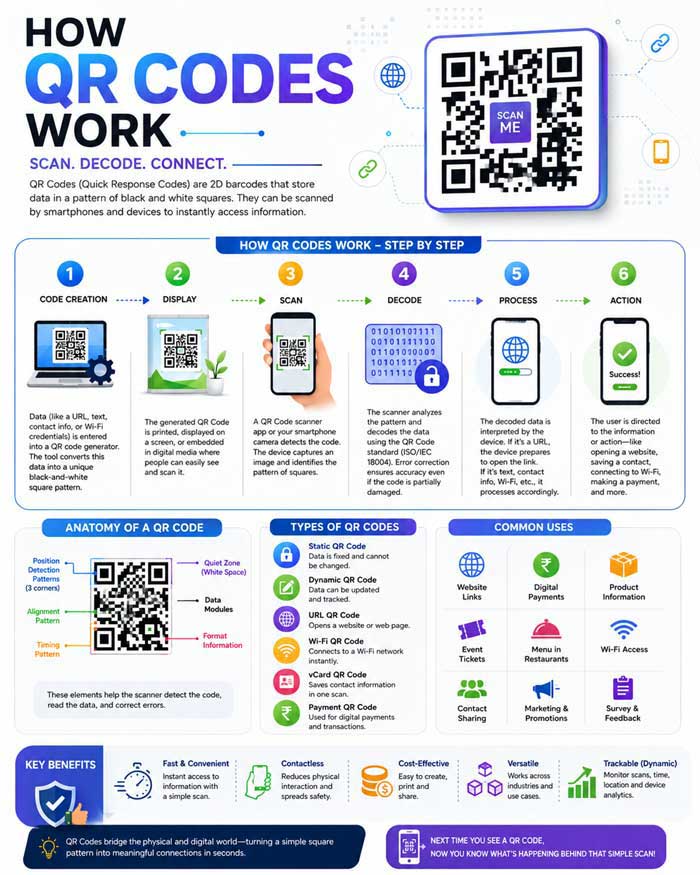
QR (Quick Response) Codes are two-dimensional barcodes that can store much more information than traditional barcodes. They can instantly direct users to websites, display contact details, connect to Wi-Fi, make payments, and much more—all with a simple smartphone scan.
What Is a QR Code?
A QR Code (Quick Response Code) is a square-shaped matrix barcode invented in 1994 by the Japanese company Denso Wave. Unlike traditional one-dimensional barcodes, QR codes can store information both horizontally and vertically, allowing them to hold thousands of characters.
Today, QR codes are widely used in:
- Website URLs
- Digital payments
- Restaurant menus
- Product information
- Event tickets
- Wi-Fi sharing
- Business cards
How QR Codes Work
The entire process takes only a fraction of a second. Here’s how it happens.
1. Data Is Encoded
Before a QR code can be created, the information must first be converted into a machine-readable format.
What Can Be Encoded?
A QR code can contain:
- Website URL
- Plain text
- Phone number
- Email address
- Contact (vCard)
- Wi-Fi credentials
- GPS coordinates
- Payment information
How Encoding Happens
The QR code generator converts every character into binary (0s and 1s). Additional information is also added, including:
- Data type
- Character count
- Error correction information
- Position markers
The result is a stream of binary data ready to be arranged inside the QR code.
2. Black and White Squares Represent Binary Information
After encoding, the binary data is arranged into tiny black and white modules (small squares).
Why Black and White?
Each module represents binary information:
- Black = 1
- White = 0
Thousands of these modules combine to form the QR code.
Important Parts of a QR Code
Finder Patterns
The three large squares located in three corners help the scanner identify the QR code’s orientation.
Alignment Pattern
A smaller square helps the scanner correctly read the code even if it’s slightly distorted.
Timing Pattern
Alternating black and white modules allow the scanner to determine the grid size.
Data Area
Most of the QR code contains the encoded information.
Quiet Zone
A blank white border surrounding the QR code prevents interference from nearby graphics or text.
3. A Scanner Captures the Image
When you point your phone’s camera at a QR code, several things happen almost instantly.
Step 1: Image Detection
The camera identifies the three finder patterns.
Step 2: Orientation Detection
The scanner determines:
- Rotation angle
- Size
- Perspective
- Position
This allows the QR code to be read even if it’s tilted or upside down.
Step 3: Grid Mapping
The software maps every small square into a digital grid.
Step 4: Binary Reading
Each module is converted back into binary values (0s and 1s).
4. Error Correction Reconstructs Damaged Data
One of the most impressive features of QR codes is their ability to remain readable even when partially damaged.
How Does It Work?
QR codes use Reed–Solomon Error Correction, which stores extra recovery information.
If part of the QR code is:
- Torn
- Scratched
- Dirty
- Covered by a logo
the scanner can reconstruct the missing information using mathematical algorithms.
Error Correction Levels
| Level | Data Recovery |
|---|---|
| L | Approximately 7% |
| M | Approximately 15% |
| Q | Approximately 25% |
| H | Approximately 30% |
Higher error correction provides greater durability but slightly reduces the amount of data that can be stored.
5. The Decoded Information Opens a Website or Displays Text
After reconstruction (if needed), the scanner decodes the binary data back into its original form.
Depending on what was encoded, your phone may:
- Open a website
- Display plain text
- Save a contact
- Connect to Wi-Fi
- Dial a phone number
- Open a payment application
- Compose an email
- Show GPS directions
This final action is what users experience after scanning the QR code.
Why QR Codes Are So Fast
QR codes are designed for rapid recognition because they:
- Store data in two dimensions
- Use finder patterns for instant detection
- Include built-in error correction
- Can be scanned from multiple angles
- Work even when partially damaged
- Are readable in low-light conditions with modern smartphone cameras
Advantages of QR Codes
Fast Access
Users can access information instantly without typing.
High Storage Capacity
QR codes can store significantly more data than traditional barcodes.
Error Resistant
Even damaged QR codes often remain readable.
Versatile
They support URLs, payments, contacts, Wi-Fi, tickets, and many other data types.
Easy to Generate
Many free and commercial tools can generate QR codes within seconds.
Common Uses of QR Codes
- Digital payments
- Restaurant menus
- Product packaging
- Business cards
- Museum guides
- Airline boarding passes
- Event tickets
- Medical records
- Warehouse inventory
- Marketing campaigns
Frequently Asked Questions (FAQs)
What does QR stand for?
QR stands for Quick Response, referring to the code’s ability to be read rapidly.
Can a QR code work without the internet?
Yes. If the QR code contains offline information such as text, a phone number, or Wi-Fi credentials, it can be decoded without internet access. Internet is only required when the encoded action needs it, such as opening a website.
Can a QR code be damaged and still work?
Yes. Thanks to built-in error correction, many QR codes remain readable even if a portion is scratched, dirty, or covered.
Are QR codes secure?
The QR code itself is simply a way to store data. However, because it can direct users to websites or trigger actions, it’s wise to scan codes only from trusted sources to avoid malicious links.
💡 Did You Know?
QR Codes were invented in 1994 by Denso Wave in Japan to track automobile parts. Today, they are used worldwide for payments, ticketing, websites, and much more.
✅ Key Takeaways
- QR Codes store large amounts of information.
- They use error correction to recover damaged data.
- Scanning is almost instantaneous.
- Used in payments, websites and tickets.